
How to Buy Cryptocurrencies via WEEX P2P?

 Prefer us on Google
Below is a step-by-step guide on how to buy cryptocurrencies via WEEX P2P. Follow these steps to ensure a safe, efficient, and smooth transaction process.
For Mobile Devices:
Step 1: Access the P2P trading page
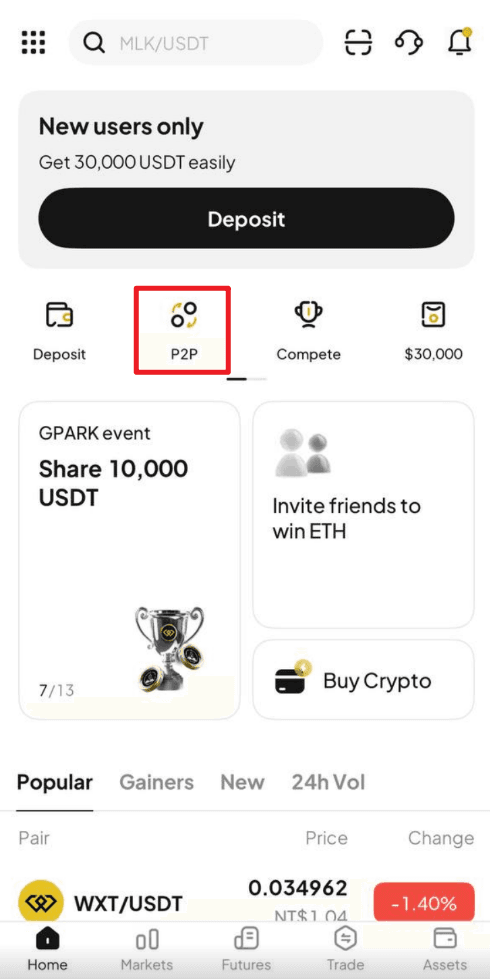
On the WEEX App, Click "P2P " from the front page.
Step 2: Set up or confirm your payment method
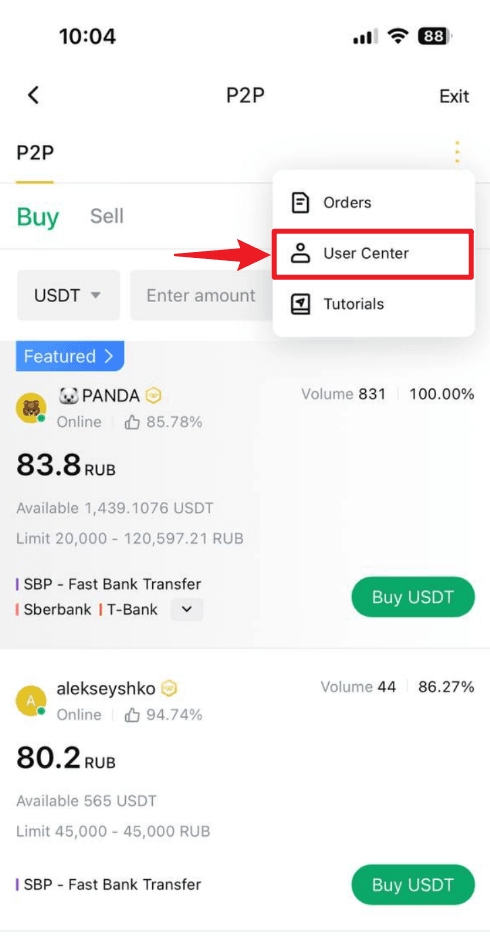
- Navigate to the "P2P management" page: Click the "More" (three-dot icon) in the top right corner, then select "User center."
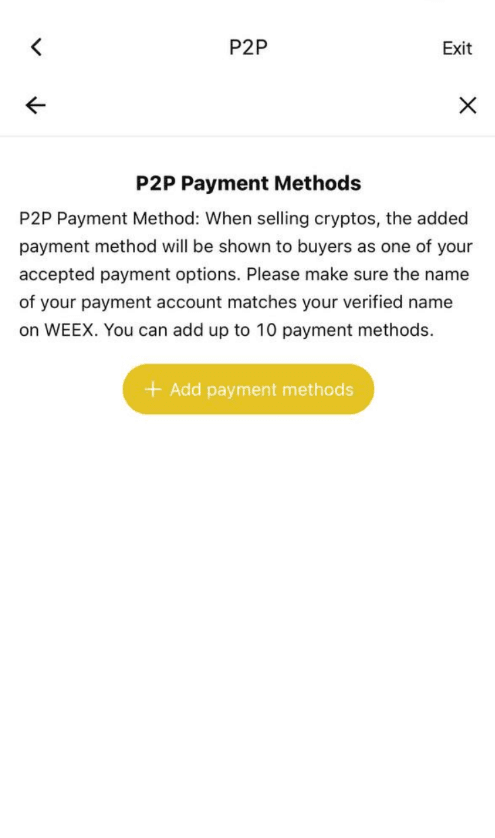
- Under "P2P payment method", click "Add payment method".
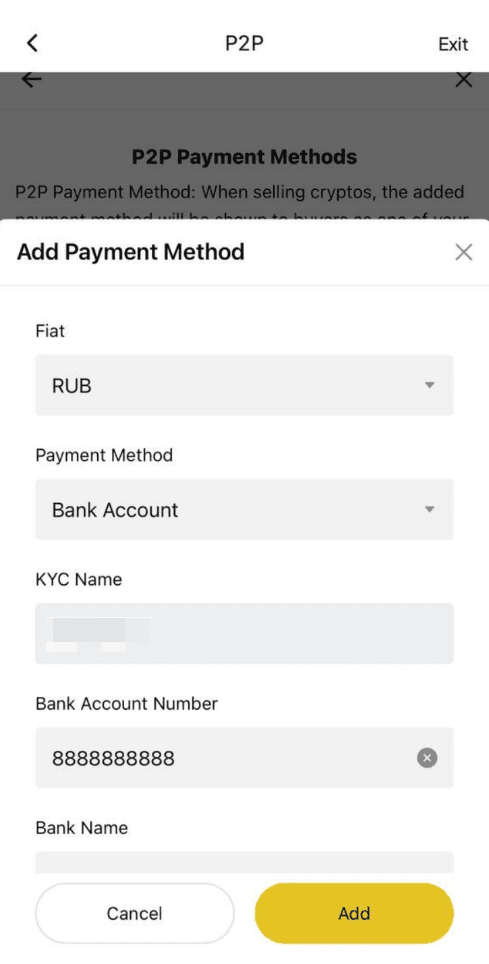
- Fill in your preferred payment details. Please ensure that the account name you provided matches the name used for your KYC verification on WEEX.
Step 3: Select a seller and place your order
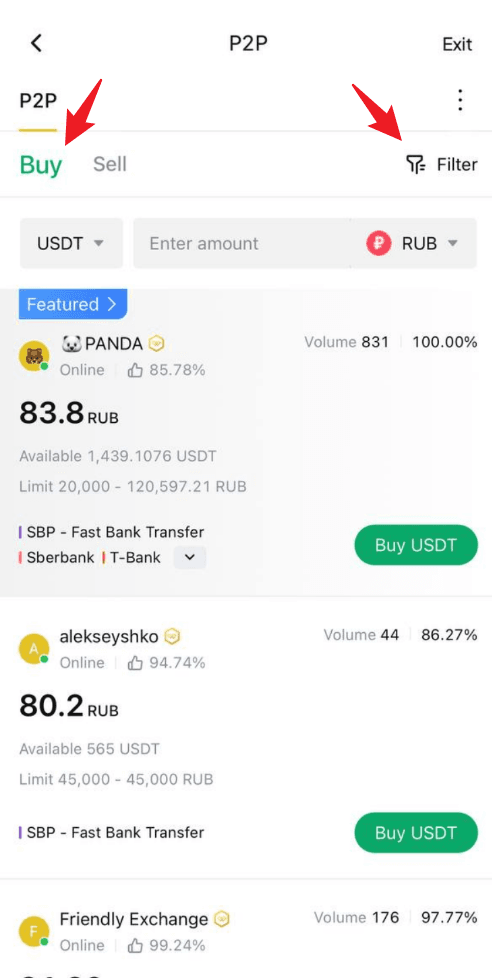
- On the P2P page, click the "Buy" tab and select the cryptocurrency you wish to buy, such as USDT, BTC, etc.
- Use the filters to set your trading preferences: - Select the cryptocurrency you want to buy - Enter the amount of fiat currency you'd like to use - Choose your preferred payment method
- Browse the list of available sellers. Focus on these key details: - Price per unit of crypto - Transaction limits - Seller’s order completion rate
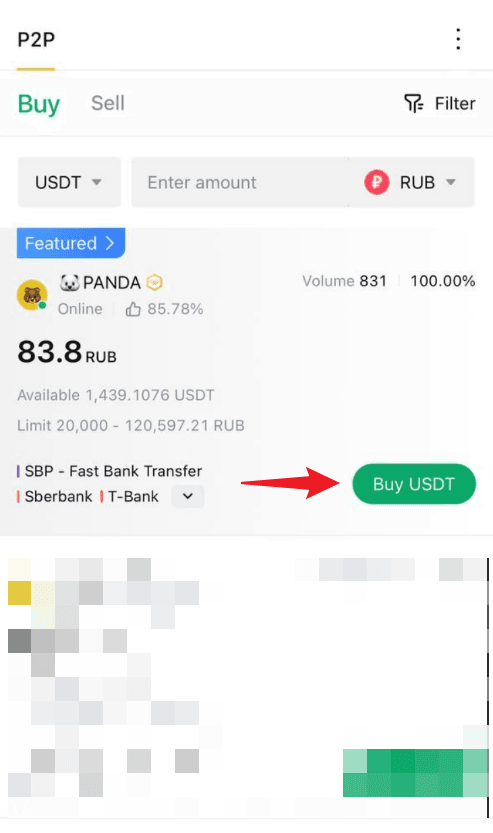
- Once you’ve found a suitable seller, click "Buy" next to their listing to initiate the order.
Step 5: Make the payment
- Transfer the specified amount to the seller’s account, following the payment details shown on the page.
- Payment notes: - Ensure the payment amount exactly matches the order amount - Double-check the seller’s information before completing the payment - Avoid using sensitive words like "cryptocurrency", "BTC", "P2P", or "WEEX" in the payment notes
- After completing the payment, return to the order page and click "Transfer Completed, Notify Seller".
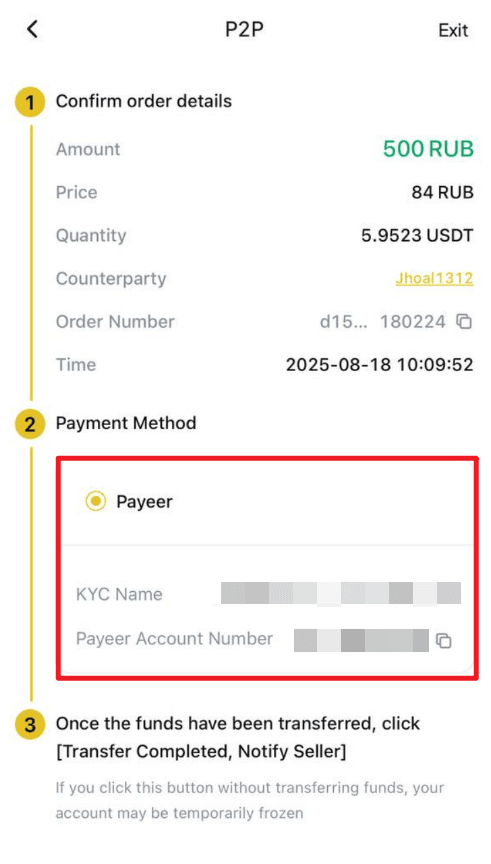
- Important notes: - Always use the payment method specified by the seller to complete the transaction - Do not click "Cancel order" before receiving a refund from the seller - Do not click "Transfer Completed, Notify Seller" until the payment is fully completed
Step 6: Receive the cryptocurrency
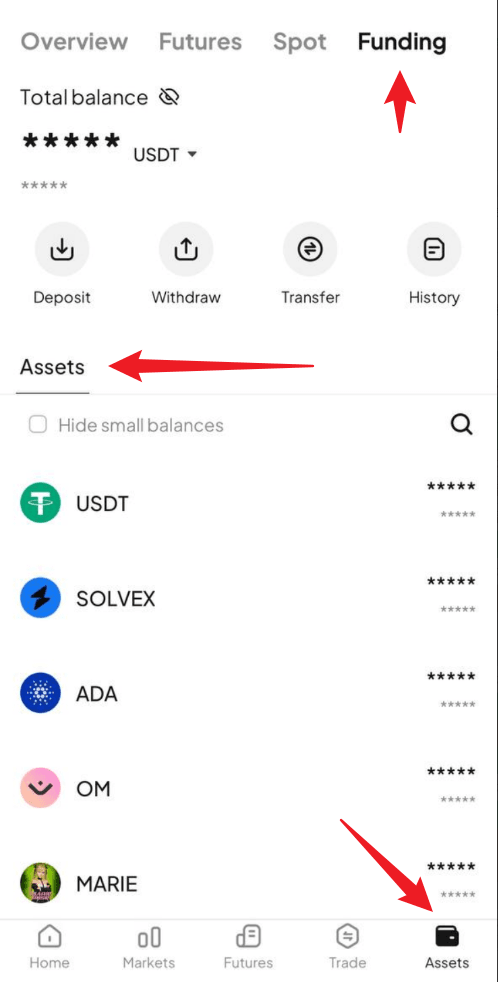
- Once the seller confirms receipt of payment, the cryptocurrency will be released to your WEEX funding account.
- You can then go directly to your Funding Account to view your purchased crypto assets.
For Web Users:
Step 1: Access the P2P trading page
On the WEEX website, go to the trading page by selecting "P2P trading" from the navigation bar.
Step 2: Set up or confirm your payment method
- Navigate to the "P2P management" page: Click the "More" (three-dot icon) in the top right corner, then select "User center."
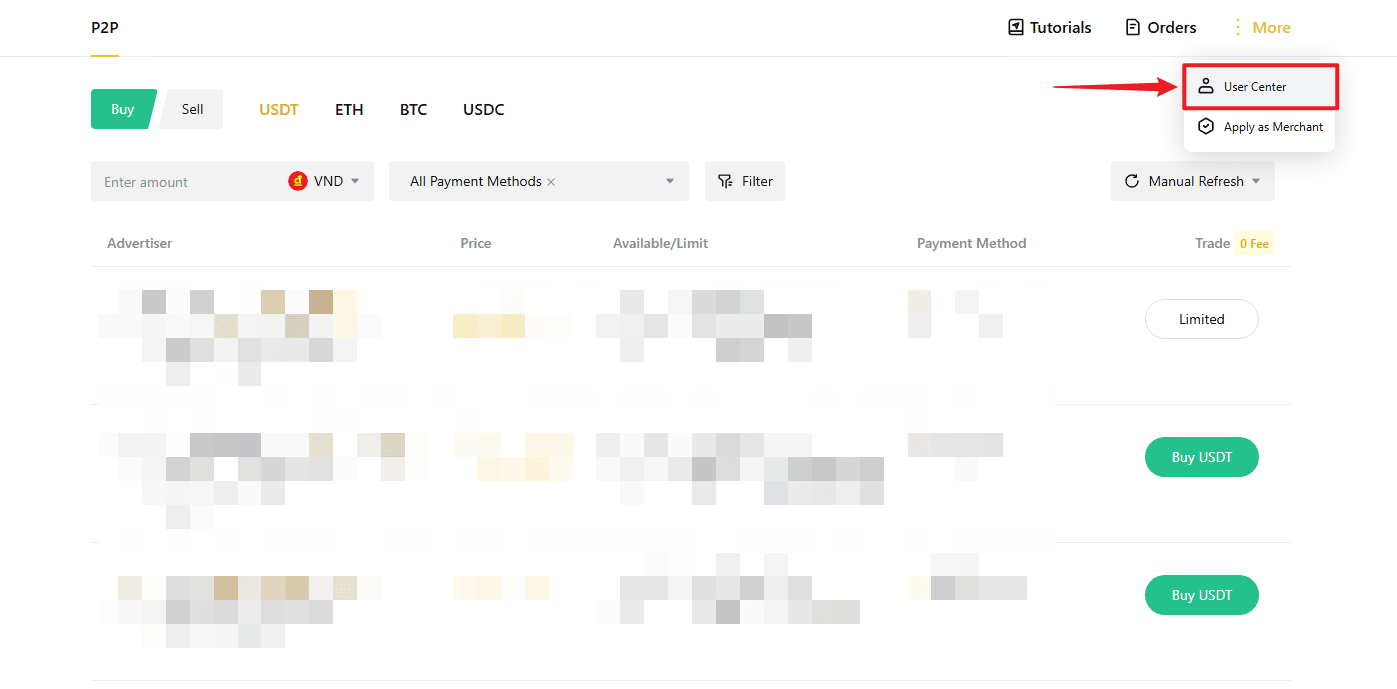
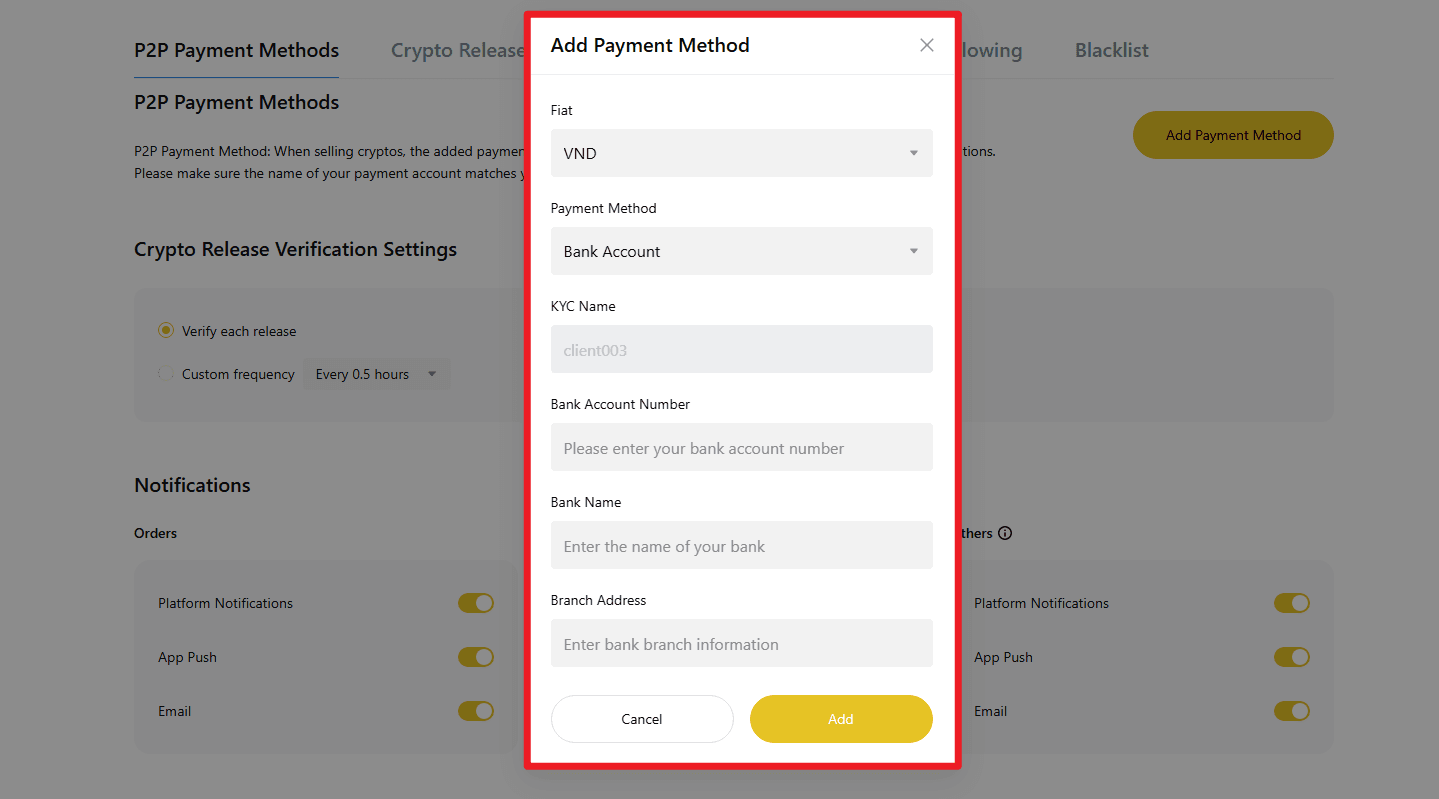
- Under "P2P payment method", click "Add payment method".

- Fill in your preferred payment details.
Please ensure that the account name you provided matches the name used for your KYC verification on WEEX.
Step 3: Select a seller and place your order
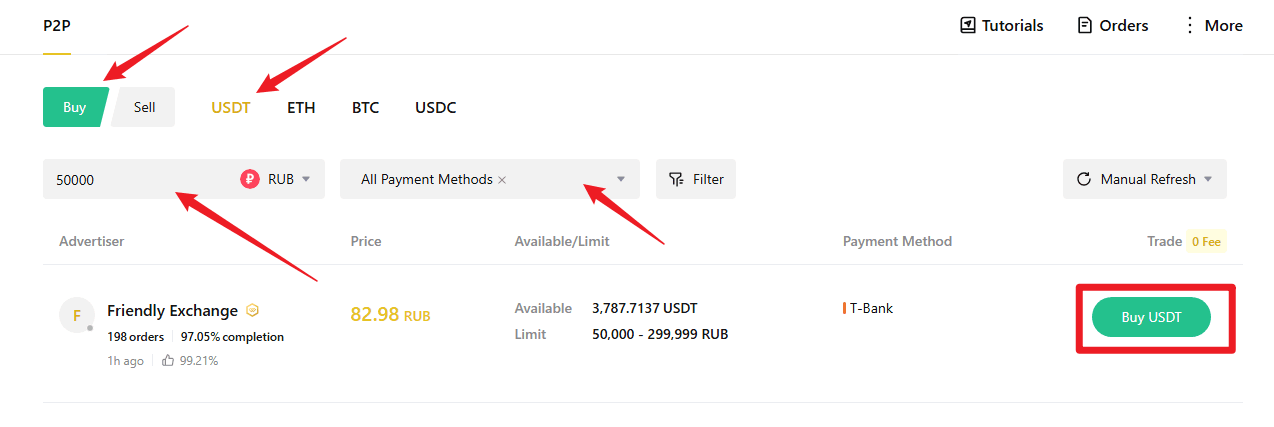
- On the P2P page, click the "Buy" tab and select the cryptocurrency you wish to buy, such as USDT, BTC, etc.
- Use the filters to set your trading preferences: - Select the cryptocurrency you want to buy - Enter the amount of fiat currency you'd like to use - Choose your preferred payment method
- Browse the list of available sellers. Focus on these key details: - Price per unit of crypto - Transaction limits - Seller’s order completion rate
- Once you’ve found a suitable seller, click "Buy" next to their listing to initiate the order.
Step 4: Enter order details and confirm
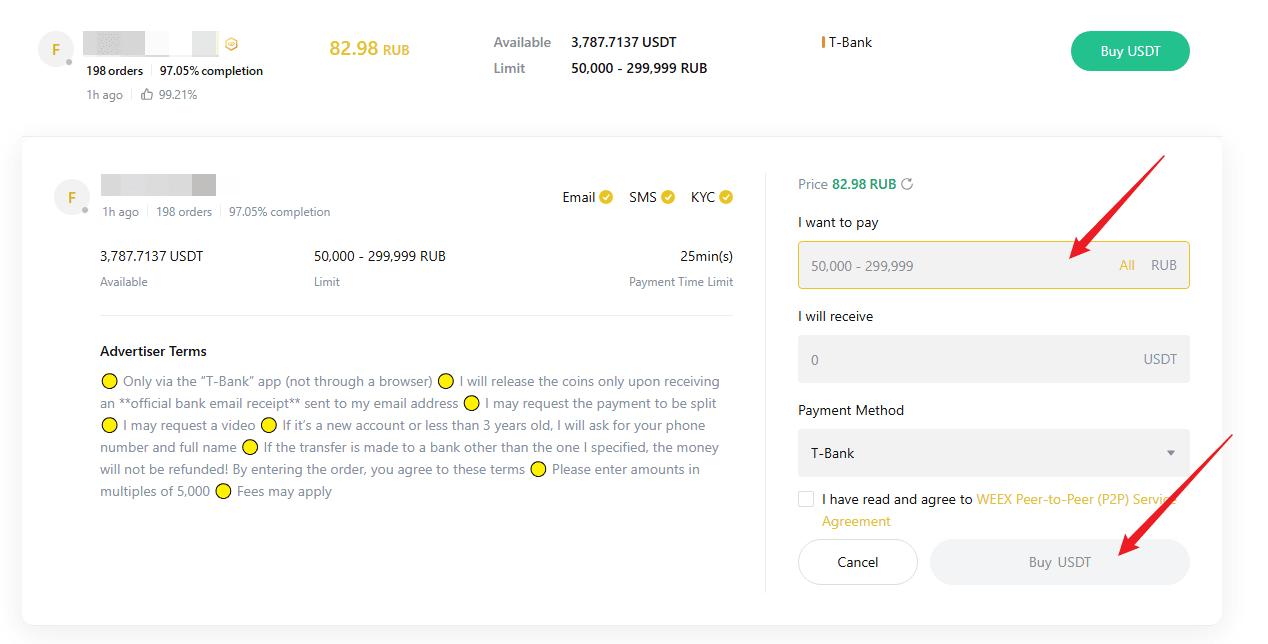
- Enter the amount of cryptocurrency you want to buy or enter the amount based on fiat currency.
- Review the transaction limits and order instructions to ensure everything meets your expectations.
- Once confirmed, click "Buy" to finalize your order.
Step 5: Make the payment
- Transfer the specified amount to the seller’s account, following the payment details shown on the page.
- Payment notes: - Ensure the payment amount exactly matches the order amount - Double-check the seller’s information before completing the payment - Avoid using sensitive words like "cryptocurrency", "BTC", "P2P", or "WEEX" in the payment
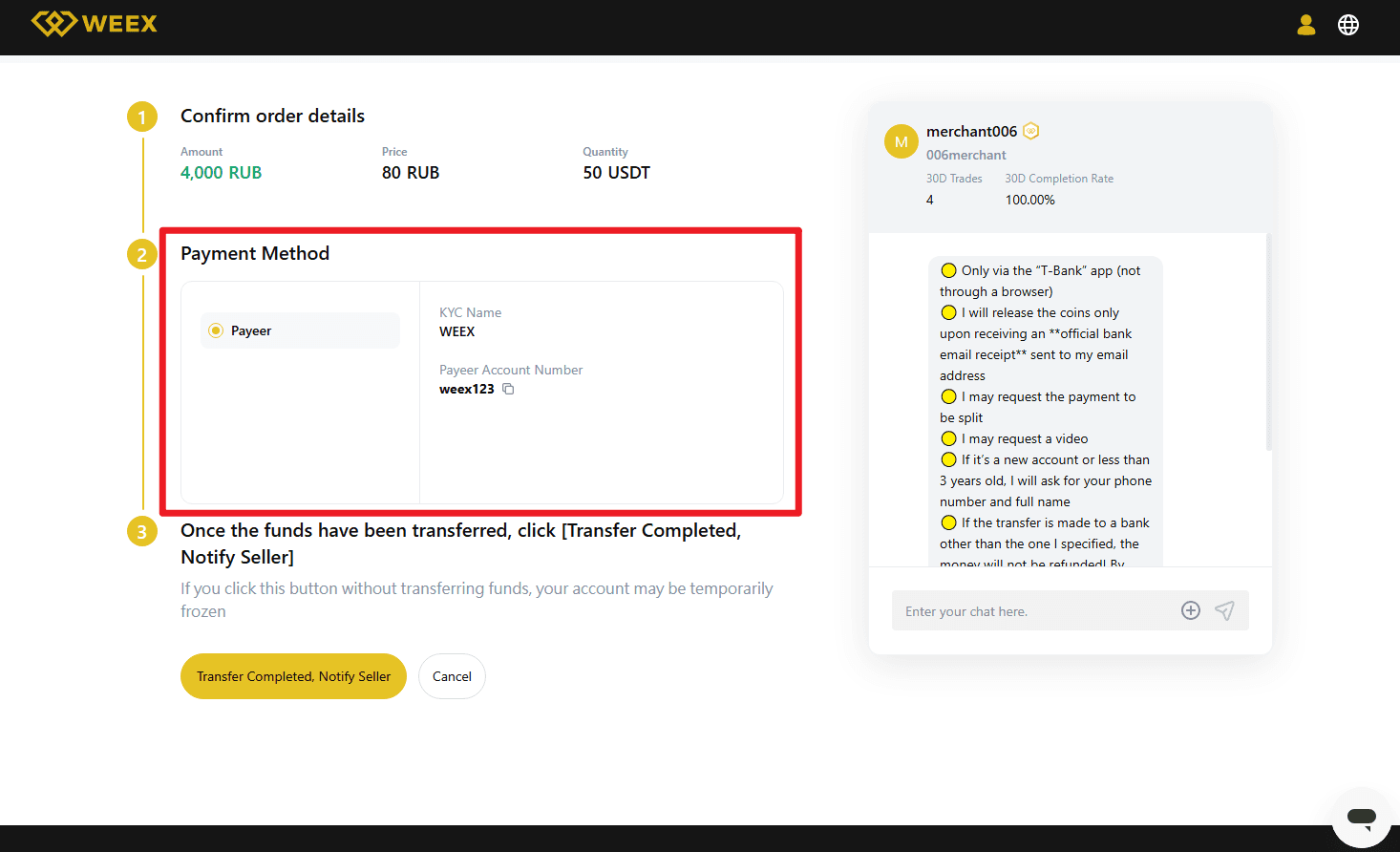
- After completing the payment, return to the order page and click "Transfer Completed, Notify Seller".
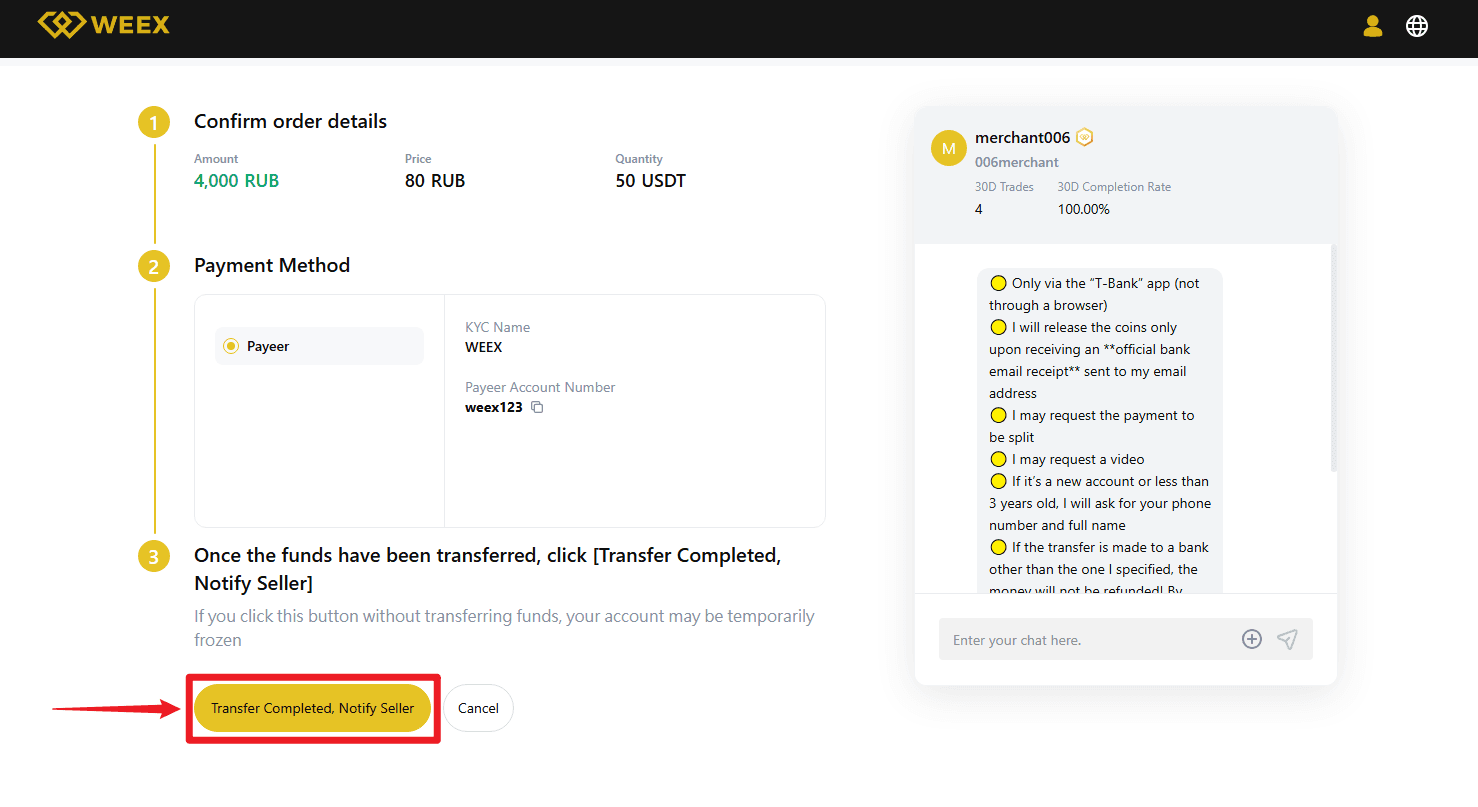
- Important notes: - Always use the payment method specified by the seller to complete the transaction - Do not click "Cancel order" before receiving a refund from the seller - Do not click "Transfer Completed, Notify Seller" until the payment is fully completed
Step 6: Receive the cryptocurrency
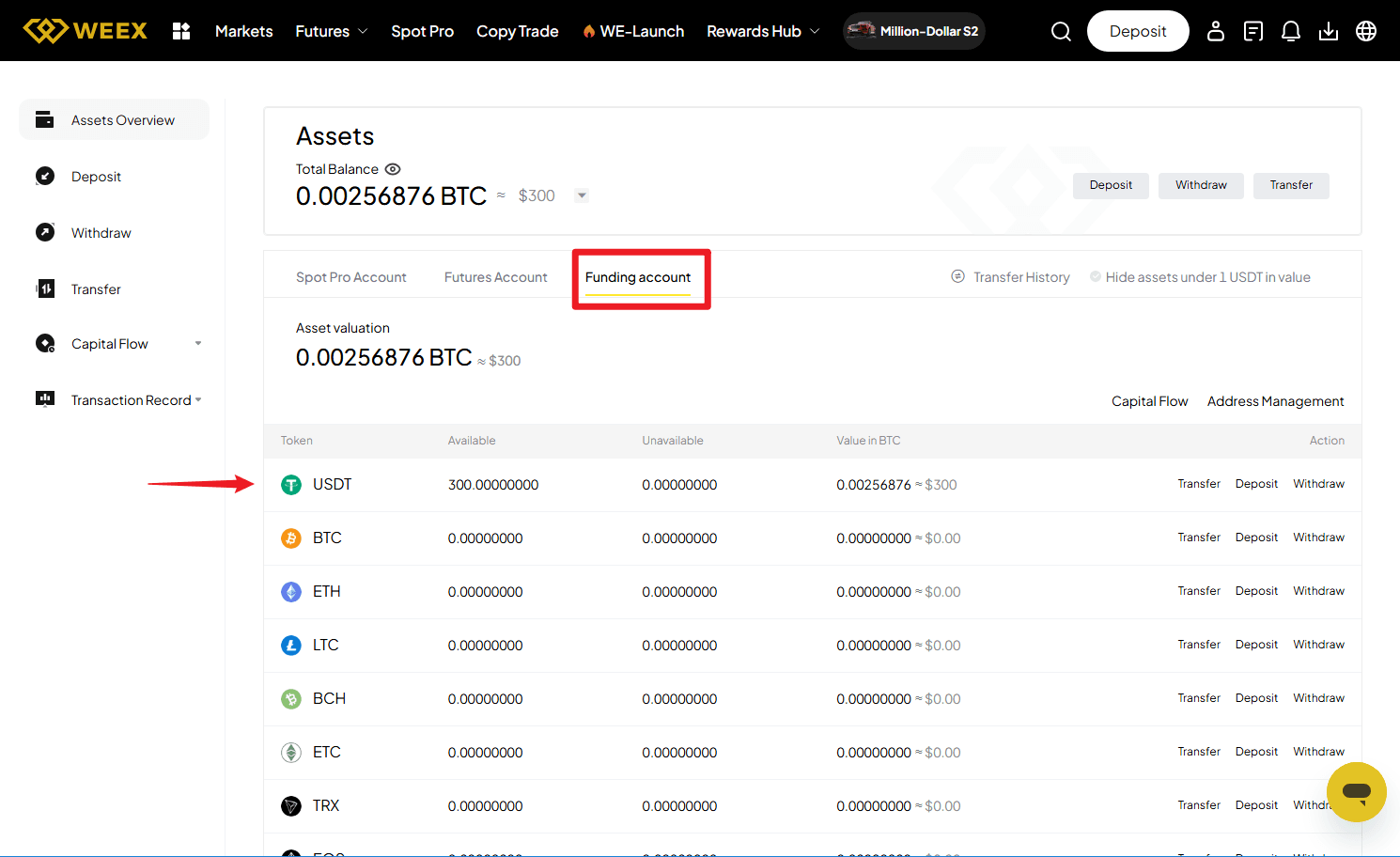
- Once the seller confirms receipt of payment, the cryptocurrency will be released to your WEEX funding account.
- You can then go directly to your Funding Account to view your purchased crypto assets.
Disclaimer: This content is provided for general branding and informational purposes only and doesn't constitute financial, investment, legal, or tax advice. Any events, rewards, online events, or related information mentioned herein should not be considered a recommendation, solicitation, or invitation to purchase, sell, trade, or otherwise deal in any crypto assets or to use any services. Crypto assets are highly volatile and may result in loss. WEEX services and online events may not be available in all regions and are subject to applicable laws, regulations, and eligibility requirements. You are responsible for ensuring that your use of WEEX services complies with local laws and for carefully assessing the risks before participating in any crypto-related activities.
You may also like

How Will the CLARITY Act and Bank-Grade Stablecoin KYC Rules Change Crypto Trading in 2026
Why Is BitMine Buying Millions of Ethereum Tokens and Staking $9 Billion in ETH in 2026
How to Protect Your Bitcoin from Physical Attacks: Lessons From the NYC Crypto Torture Case in 2026

What Is the NYC Crypto Kidnapping Case? The Soho Bitcoin Attack Explained — 2026 Case Analysis
SpaceX Stock (SPCX): Now Public, and Back Where It Started
USA Rare Earth (USAR): What It Is and How to Trade the Token
NVIDIA Stock in 2026: Real Shares, Tokenized NVDA, and Perpetuals Compared
How to Buy USAR Coin: Buying Tokenized USA Rare Earth Stock the Right Way
WEEX Poker Party Series 4: Draw Cards to Split a $1M USDT Pool
Who Really Makes Money on Prediction Markets? Smart Money vs Retail Traders
The Hidden Problem With Prediction Markets: Who Pays the Winners?
Prediction Markets Are the Future of Finance or Just Gambling?
How Polymarket and Kalshi Turned Predictions Into a Billion-Dollar Business

Why Prediction Markets Are So Hard to Regulate: The CFTC vs SEC Debate
Are Prediction Markets Legal? CFTC vs SEC Regulation Explained
Why Is TSMC Stock Down After a 77% Profit Jump? What Wall Street Is Actually Worried About
Is Samsung Stock a Buy at Its Lowest Level Since the AI Boom Began?
Samsung Stock and the KOSPI Bear Market: What the 30% Decline From Peak Tells Investors
Oil Price Above $90: What the US-Iran War Means for Your Portfolio Right Now
Iran War and Bitcoin: Why Crypto Is Not Acting Like a Safe Haven at $90 Oil
KOSPI Stock Market Enters Bear Market: What a 25% Drop From the Peak Means for Investors
KOSPI Stock Bear Market: What It Means for Samsung, SK Hynix and Korean Chip Stocks
Is the KOSPI Stock Market a Buy After Entering Bear Market Territory?
SK Hynix Leveraged ETFs SKHL SKHX SKHZ: What Each One Does and Who Should Use Them
Barclays Sees 70% Upside for SK Hynix Stock: What the Overweight Rating Means
Is SK Hynix Stock a Buy Now? What the 52 Week Low and IPO Price Break Tell Investors
Is This Really Messi's Last World Cup? What the 2026 Final Means for His Legacy
Who Is Ferran Torres? The Substitute Who Won the 2026 World Cup for Spain
2026 FIFA World Cup Winner: Spain Beats Argentina to Claim Second World Title
SK Hynix Stock: SKHY's Wild Nasdaq Debut and What Comes Next
How Will the CLARITY Act and Bank-Grade Stablecoin KYC Rules Change Crypto Trading in 2026
Why Is BitMine Buying Millions of Ethereum Tokens and Staking $9 Billion in ETH in 2026
How to Protect Your Bitcoin from Physical Attacks: Lessons From the NYC Crypto Torture Case in 2026
What Is the NYC Crypto Kidnapping Case? The Soho Bitcoin Attack Explained — 2026 Case Analysis
SpaceX Stock (SPCX): Now Public, and Back Where It Started
USA Rare Earth (USAR): What It Is and How to Trade the Token
Contents
Popular coins
Latest articles