
WEEX: Position Take Profit and Stop Loss Feature

 Prefer us on Google
In futures trading, the real challenge is usually how to exit, not when to enter. Delayed stop-losses, giving back unrealized gains, and uncontrolled risk after scaling in—these are the main drivers of drawdowns.
The Position Take-Profit / Stop-Loss feature now lives and running stably on WEEX lets you predefine both profit capture and maximum loss for an entire position in one go. Once triggered, it executes a full position market close automatically—reducing emotional interference, improving execution certainty during sharp volatility, and turning risk–reward into measurable, reviewable data.
This article will clearly and quickly cover: what it is, when to use it, its core benefits, how to set it properly, plus common FAQs.
What Is Position Take-Profit / Stop-Loss?
Position Take-Profit / Stop-Loss sets exit conditions for the entire current futures position. After you define a take-profit price and/or a stop-loss price for a position, once market price hits a trigger, the system attempts to close all remaining size at market.
When It’s Useful
Typical scenarios include:
- Unified exit after scaling into multiple fills
- Unable to monitor the market continuously
- Defining worst-case loss before key events or data
- Strategies requiring fixed risk–reward ratios
- Emotional swings driven by floating PnL
- Accounts enforcing per-trade risk caps
If you need laddered partial take-profit, ultra-short-term scalping, or order book microstructure tactics, you will need to combine this with other tools.
Benefits of the Position Take Profit and Stop Loss feature:
- Automated trading and simplified management: Users do not need to manually close positions; the system automatically handles trades based on preset conditions, helping users quickly lock in profits or limit losses while reducing the need to constantly monitor market dynamics.
- Reduced emotional interference and faster response: With automated settings, users can minimize the impact of emotions on decision-making, respond quickly to market changes, and effectively control risks to protect their capital.
How to Set Up the Position Take Profit and Stop Loss?
APP:
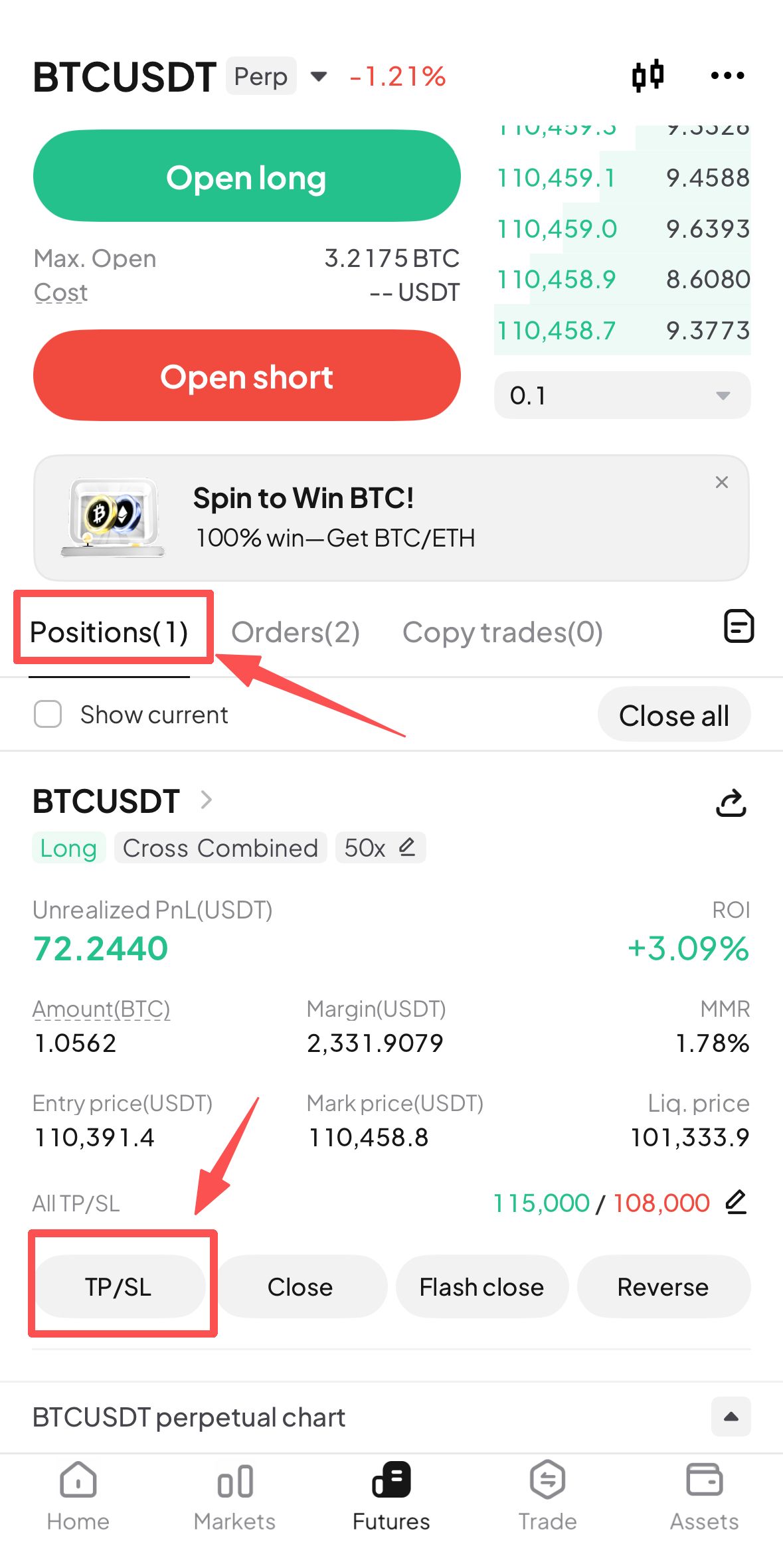
- After opening a futures trading order, users can find the "TP/SL" button in the Positions interface.
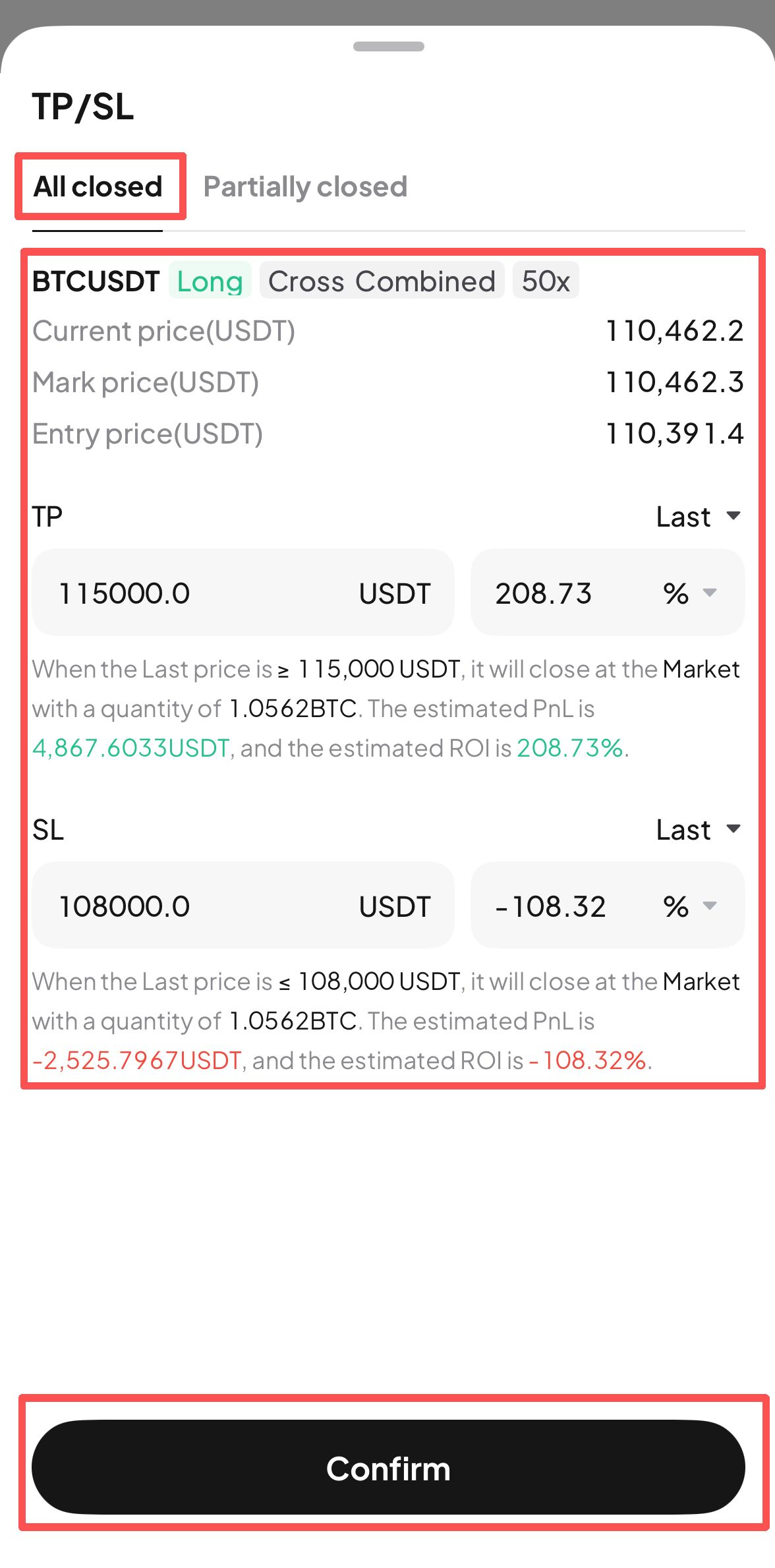
- Click the "TP/SL" button to enter the setup interface for the entire position take profit and stop loss. Users can fill in the take profit target price or stop loss target price based on their trading strategy, and click "Confirm" once completed.
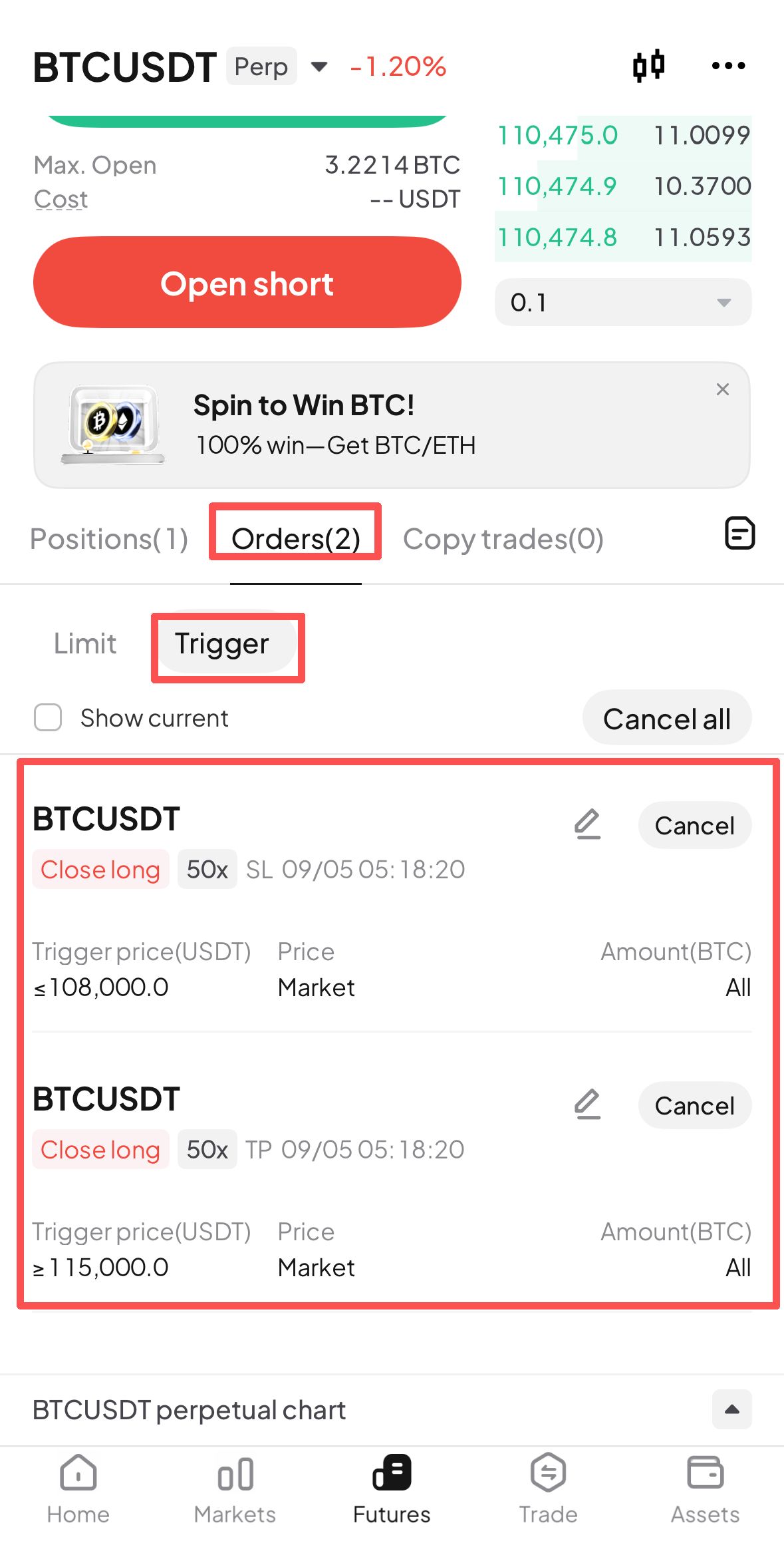
- After setting up the take profit/stop loss for the entire position, users can find the corresponding take profit/stop loss orders in the Trigger section of the Orders interface. When the asset price reaches the specified order price, the system will automatically execute a market order to close the entire position.
WEB:
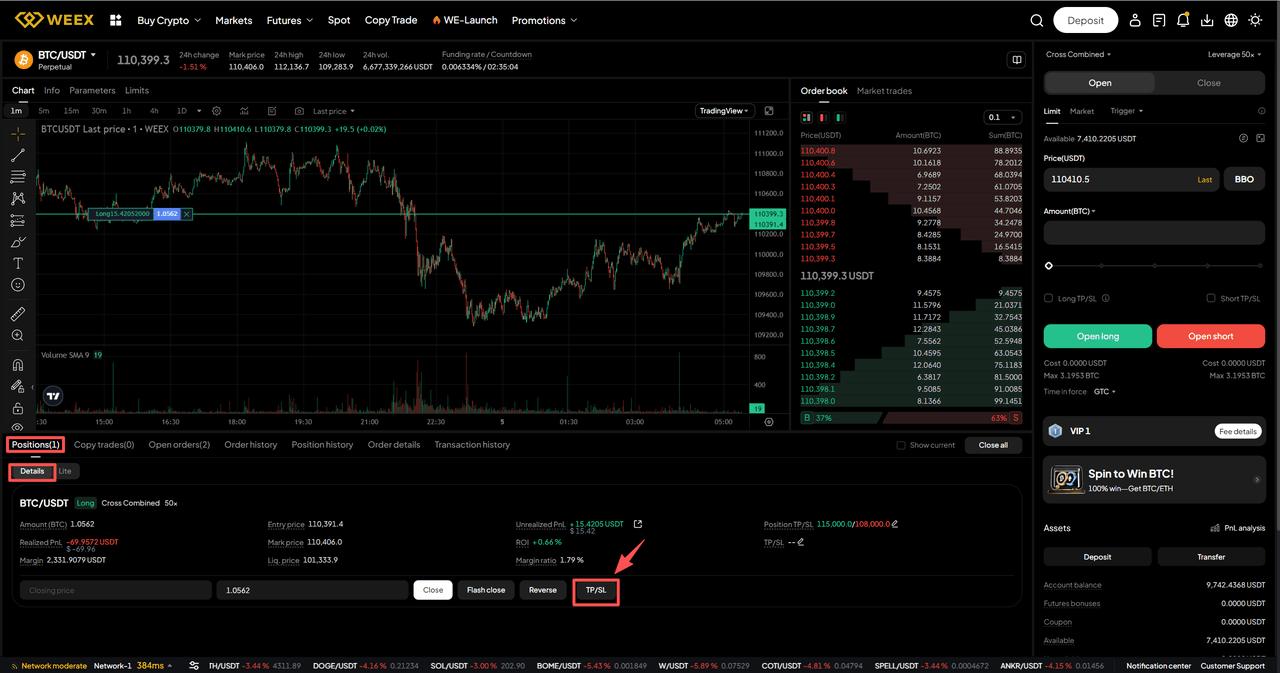
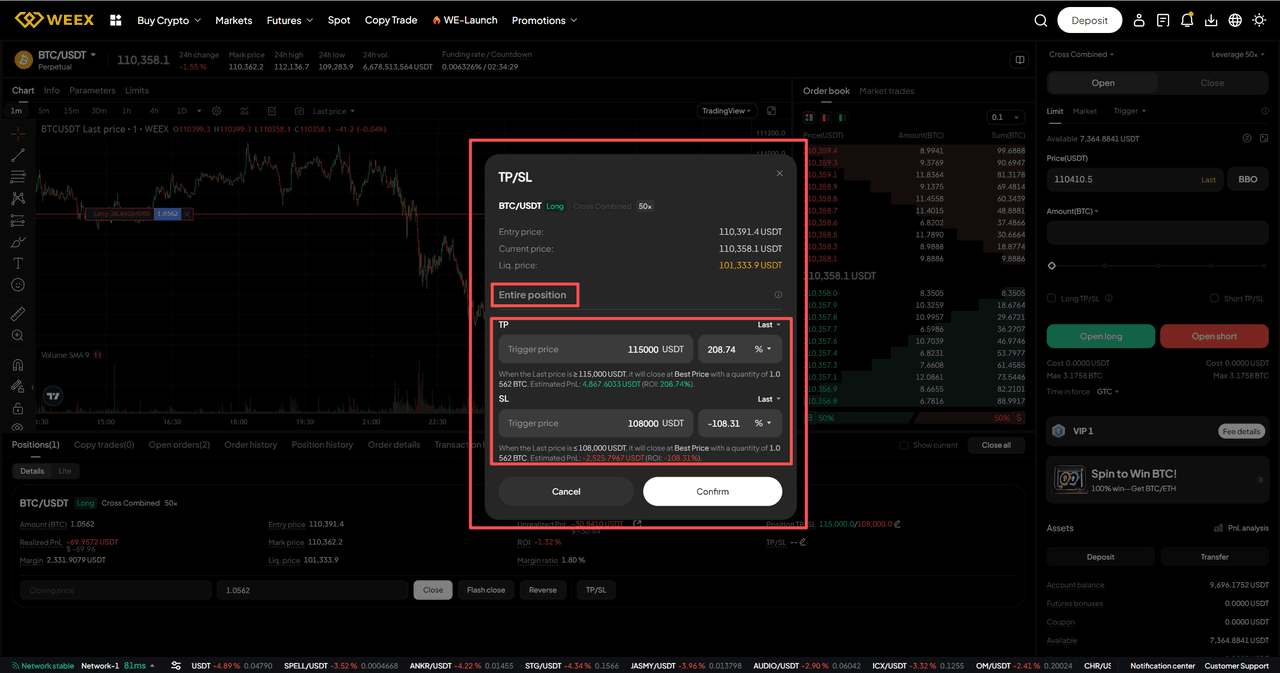
- After opening a futures trading order, users can find the "TP/SL" button in the Details section of the Positions interface.
- Click the "TP/SL" button to enter the setup interface for the entire position take profit and stop loss. Users can fill in the take profit target price or stop loss target price based on their trading strategy, and click "Confirm" once completed.
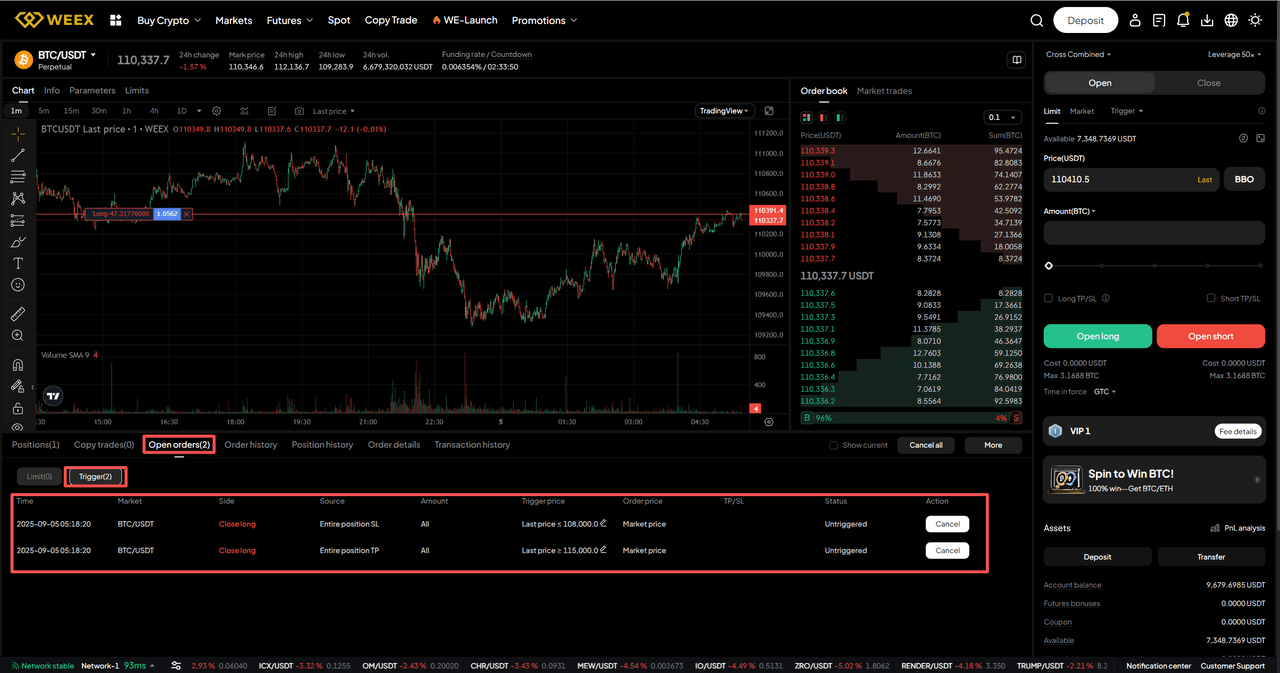
- After setting up the take profit/stop loss for the entire position, users can find the corresponding take profit/stop loss orders in the Trigger section of the Open orders interface. When the asset price reaches the specified order price, the system will automatically execute a market order to close the entire position.
Q&A
1. Do I have to set both take‑profit and stop‑loss?
No. You can set only a stop‑loss (cap worst loss), only a take‑profit (lock in expected gain), or both to define a fixed risk‑reward ratio.
2. Will it always fill exactly at my set price once triggered?
No guarantee. A trigger just means the condition is met; the system then sends a market close. The actual average fill can differ due to slippage, depth, and volatility.
3. Can I modify or cancel after setting it?
Yes. Open the position’s Take-Profit/Stop-Loss panel to adjust or remove. The latest submission overrides prior ones. If you’ve manually reduced part of the position, the remaining size keeps using the updated settings.
Disclaimer: This content is provided for general branding and informational purposes only and doesn't constitute financial, investment, legal, or tax advice. Any events, rewards, online events, or related information mentioned herein should not be considered a recommendation, solicitation, or invitation to purchase, sell, trade, or otherwise deal in any crypto assets or to use any services. Crypto assets are highly volatile and may result in loss. WEEX services and online events may not be available in all regions and are subject to applicable laws, regulations, and eligibility requirements. You are responsible for ensuring that your use of WEEX services complies with local laws and for carefully assessing the risks before participating in any crypto-related activities.
You may also like

How Will the CLARITY Act and Bank-Grade Stablecoin KYC Rules Change Crypto Trading in 2026
Why Is BitMine Buying Millions of Ethereum Tokens and Staking $9 Billion in ETH in 2026
How to Protect Your Bitcoin from Physical Attacks: Lessons From the NYC Crypto Torture Case in 2026

What Is the NYC Crypto Kidnapping Case? The Soho Bitcoin Attack Explained — 2026 Case Analysis

SpaceX Stock (SPCX): Now Public, and Back Where It Started
USA Rare Earth (USAR): What It Is and How to Trade the Token
NVIDIA Stock in 2026: Real Shares, Tokenized NVDA, and Perpetuals Compared
How to Buy USAR Coin: Buying Tokenized USA Rare Earth Stock the Right Way
WEEX Poker Party Series 4: Draw Cards to Split a $1M USDT Pool
Why Prediction Markets Are So Hard to Regulate: The CFTC vs SEC Debate

Are Prediction Markets Legal? CFTC vs SEC Regulation Explained

Why Is TSMC Stock Down After a 77% Profit Jump? What Wall Street Is Actually Worried About
Is Samsung Stock a Buy at Its Lowest Level Since the AI Boom Began?
Samsung Stock and the KOSPI Bear Market: What the 30% Decline From Peak Tells Investors
Oil Price Above $90: What the US-Iran War Means for Your Portfolio Right Now
Iran War and Bitcoin: Why Crypto Is Not Acting Like a Safe Haven at $90 Oil
KOSPI Stock Market Enters Bear Market: What a 25% Drop From the Peak Means for Investors
KOSPI Stock Bear Market: What It Means for Samsung, SK Hynix and Korean Chip Stocks
Is the KOSPI Stock Market a Buy After Entering Bear Market Territory?
SK Hynix Leveraged ETFs SKHL SKHX SKHZ: What Each One Does and Who Should Use Them
Barclays Sees 70% Upside for SK Hynix Stock: What the Overweight Rating Means
Is SK Hynix Stock a Buy Now? What the 52 Week Low and IPO Price Break Tell Investors
Is This Really Messi's Last World Cup? What the 2026 Final Means for His Legacy
Who Is Ferran Torres? The Substitute Who Won the 2026 World Cup for Spain
2026 FIFA World Cup Winner: Spain Beats Argentina to Claim Second World Title
SK Hynix Stock: SKHY's Wild Nasdaq Debut and What Comes Next
JEPQ Stock in 2026: Price, Monthly Dividend, and Real Risks
FIFA World Cup 2026 Final Winner: Spain Beat Argentina 1-0 in Extra Time
Cathie Wood AMD Stock Sale: Why ARK Keeps Trimming a 140% Winner

Argentina vs Spain World Cup Final 2026: Score and Crypto Fallout
How Will the CLARITY Act and Bank-Grade Stablecoin KYC Rules Change Crypto Trading in 2026
Why Is BitMine Buying Millions of Ethereum Tokens and Staking $9 Billion in ETH in 2026
How to Protect Your Bitcoin from Physical Attacks: Lessons From the NYC Crypto Torture Case in 2026
What Is the NYC Crypto Kidnapping Case? The Soho Bitcoin Attack Explained — 2026 Case Analysis
SpaceX Stock (SPCX): Now Public, and Back Where It Started
USA Rare Earth (USAR): What It Is and How to Trade the Token
Contents
Popular coins
Latest articles



